A lack of essential tasks such as hardware inventory, dependency mapping, or a controlled cutover has a tendency to cause teams to run around after the problems rather than prevent them, leading to cost overruns. Data Center migration services are a great option for companies that have important strategic goals such as improving disaster recovery, modernizing enterprise applications, reducing physical infrastructure, and increasing scalability.
It is also one of the most demanding undertakings an enterprise IT team can face, and without a well-thought-out strategy, the consequences are immediate unplanned downtime, data corruption, compliance violations, and costs that spiral far beyond what the project was supposed to require. This is precisely why getting the right data center migration company involved from the beginning matters so much.
CrownTECH addresses all of these dimensions through a systematic, infrastructure-focused methodology built around business continuity, complete data preservation, and full compliance, covering both local and cross-border moves across Canada and the United States. As a full-service data center migration company, we take ownership of every phase, from initial discovery through to certified decommissioning, ensuring that experienced migration teams consistently reduce risk and deliver outcomes organizations can actually count on.
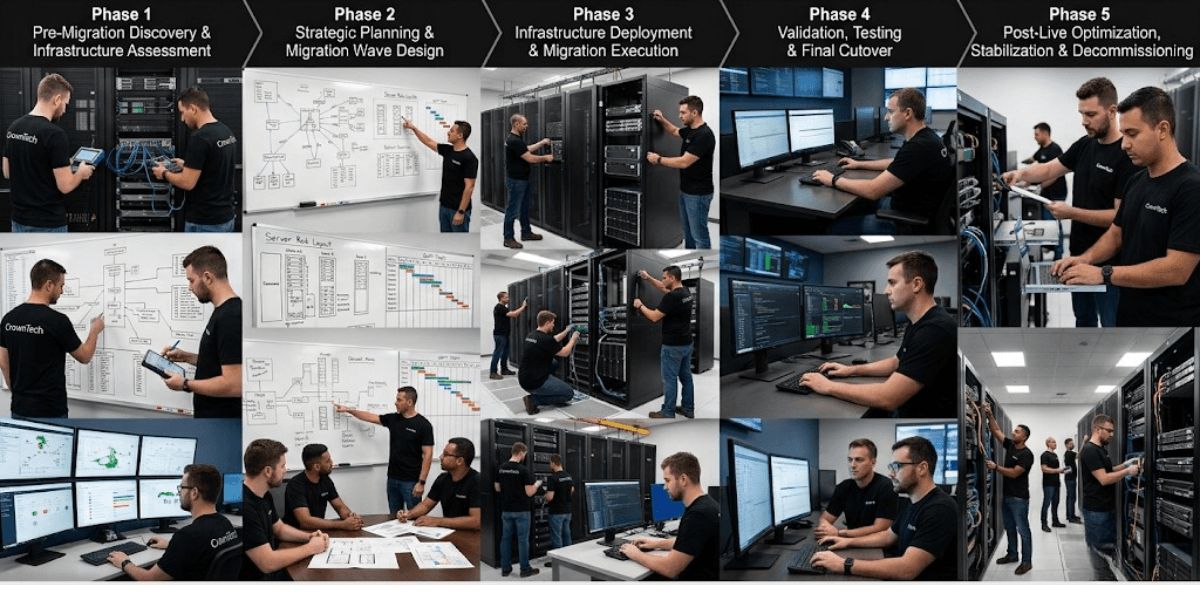
The Five Phases in the Data Center Migration Lifecycle
The migration lifecycle involves more than just one event; it consists of a series of technical and operational stages which succeed one another. If any of these stages are omitted or shortened, compounding risk is introduced further along. The following is a detailed explanation of each stage and the reason why each part of it is important.
Phase 1: Pre-Migration Discovery & Infrastructure Assessment
Teams have to have a complete and accurate understanding of the current environment before any cable is moved or any virtual machine is copied; this stage forms the basis for all the other decisions.
Putting together a thorough data center migration checklist at this stage is key to making sure that no asset, dependency, compliance requirement, or network configuration is missed before planning starts. Teams that skip this step often run into surprises later on, discovering hidden systems, unlicensed software, and undocumented interdependencies at the worst possible times during execution.
Detailed Asset Discovery & Inventory Audit
- Hardware & Systems Mapping
Catalogue all physical servers, network switches, routers, storage arrays, and virtual machines (VMs) across current facilities. This process should produce a live, verified asset register, not a spreadsheet inherited from a previous project. Any discrepancy between documented and actual inventory at this stage will compound into migration errors later. - Software & Database Profiling
Detect operating system versions, running services, active databases, licensing terms and third-party software integrations. The software or end-of-life systems found here will impact the migration approach and whether workloads require remediation prior to migration. - Network Baseline Capture
Map the current VLAN configurations, IP address assignments, bandwidth requirements, and firewall policies. This baseline then serves as the reference document when replicating or improving the network architecture in the target environment and acts as a key input to the final data center migration project plan.
Application & Dependency Mapping
- Upstream & Downstream Interdependencies
When arranging applications, it is crucial to consider applications that require the same services, apps that use the same domain controller, apps that share database links, and apps that use the same external APIs. Applications may be self-contained, but they typically have some other dependencies that may need to be addressed, such as authentication requirements, file paths, or API integrations, and if you move an application without taking those dependencies into consideration, you risk failing. - Workload Criticality Classification
Let's divide up the work according to the impact on the business:- Tier 1 (Mission-Critical): These systems are essential; any outage can lead to immediate revenue loss or compromise patient safety.
- Tier 2 (Business-Essential): Systems that affect productivity but tolerate brief planned windows
- Tier 3 (Non-Critical): Development environments, archival systems, and low-traffic internal utilities
Risk Assessment & Governance Audits
- Downtime Tolerance Analysis
Set Recovery Time Objectives (RTOs) and Recovery Point Objectives (RPOs) for each application level; these values will influence all cutover decisions, the length of each maintenance window, and the rollback trigger in the subsequent phases. - Regulatory Compliance Check
It is necessary to check the chain-of-custody procedures for sensitive data within the HIPAA, PHIPA, SOC 2, or PCI-DSS frameworks. The compliance requirements have to be documented prior to the start of the migration, not only after a regulator has raised a flag following the cutover. When organizations are carrying out a migration to a cloud data center, it is especially important to understand the data residency requirements at this stage.
Phase 2: Strategic Planning & Migration Wave Design
With the established inventory of assets and their interdependencies, the initial step is to develop a comprehensive plan for migrating the data center. The plan is a living document that guides the sequence of steps, the utilization of resources, the timing of migrations in waves, and the rollback procedures in case of a problem.
Selecting the Migration Strategy (The 6 Rs Framework)
The different workloads do not all behave in the same manner, and we use the 6 Rs Framework in order to determine the appropriate strategy for each system.
- Rehost (Lift-and-Shift): This involves transferring physical or virtual servers to the new environment exactly as they are, without making any changes to the architecture. It is most suitable for stable and well-understood workloads where speed is important.
- Replatform: Making minor optimizations, such as updating database versions, to take advantage of target environment capabilities without a full architectural overhaul.
- Refactor / Re-architect: Restructuring applications to run natively in cloud architectures. This approach underpins any cloud data center migration strategy. Reserve it for applications where long-term performance or scalability gains justify the added complexity and planning effort.
- Retain/Retire: Retain legacy systems on-premises where migration risk outweighs benefit, or decommission obsolete applications that no longer serve a business function.
Migration Wave Sequencing
- Non-Production First
Begin by initiating migration waves in the development, test, and staging environments in order to improve the scripts and correct any misconfigurations before attempting to migrate to the production systems; mistakes found in these environments cost hours, but mistakes discovered in production result in lost revenue. - Simple Workloads to Complex Systems
It is advisable to migrate low-dependency workloads, such as file shares and separate internal utilities, before moving multi-tier ERPs or transactional databases; each wave serves to improve the team's ability to carry out the task beforehand. - Resource Grouping
Group together the servers that have immediate database or authentication dependencies in the same migration wave since splitting interdependent systems across different waves is one of the most frequent reasons for application failures after the cutover.
Target Environment Architecture & Rollback Planning
- Target Environment Provisioning
Design cloud landing zones, colocation rack footprints, power densities, and structured cabling blueprints before moving any workload. The destination environment must be validated and live-tested before it receives production traffic. For cloud data center migration projects, this includes defining network segmentation, access controls, and cloud-native service dependencies upfront. - Rollback & Failover Trigger Protocols
Establish documented go/no-go decision trees, fallback schedules, and pre-cutover rollback triggers. Knowing exactly when to abort a cutover and how quickly the team can revert is as important as knowing how to proceed. These protocols are a core component of any well-structured data center migration project plan, and a reputable data center migration company will never begin execution without them.
Phase 3: Infrastructure Deployment & Migration Execution
The process starts with the target environment, not with the workloads; in fact, addressing the infrastructure is a key feature of well-established data center migration services and is the main factor that distinguishes providers who prevent problems from those who have to react to them.
Target Infrastructure & Connectivity Setup
- Network & Security Foundation
Prior to moving any application data, it's essential to configure the WAN/VPN links between the legacy and new sites. Don't forget to provision firewall rules, IAM roles, and centralized DNS settings. The security posture at the destination should be equal to or better than the source environment from day one. - Infrastructure-First Deployment
Before users' systems are deployed, it is necessary to check that the network switches, the rack configurations, the storage devices, and the core domain controllers are online and have been verified. It is a major reason for cutover failure to migrate workloads into a network environment that has not been validated, and any experienced data center migration company would eliminate this gap before carrying out the migration.
Data Replication & Parallel Operations
- Initial & Differential Data Replication
Synchronize the data in bulk and then carry out continuous block-level or database transaction replication in order to reduce the cutover delta. The smaller the data gap at the time of cutover, the shorter the maintenance window will be. - Parallel Dual-Site Management
Keep those network bridges and shared services running smoothly between both the current and new sites to facilitate hybrid operations during the transition phases. This approach of having a dual-site setup guarantees that business functions won’t rely solely on one environment while you're in the middle of migration. - Secure Logistics & Physical Moving
CrownTECH makes sure your hardware moves smoothly across Canada and the US by using climate-controlled transport, keeping a close eye on chain-of-custody tracking, and coordinating with customs brokers. This way, we guarantee that your equipment stays safe and meets all regulatory requirements during transit.
Phase 4: Validation, Testing & Final Cutover
A system will not go into production unless it has cleared the various documented validation stages. It is essential to go over the data center migration checklist, which was put together in Phase 1 at this point; this serves as a vital quality control measure to make certain that all the assets, dependencies, and compliance requirements that had been recorded have been thoroughly taken into account and independently verified in the target environment before any traffic is diverted.
Multi-Tiered Testing Protocols
- Functional & Technical Validation
Make sure that the database connectivity, schema integrity, and network latency are verified for all the systems that have been migrated. Each of these checks must be logged and signed off before cutover is approved. - Performance Simulation
Execute stress tests under simulated production loads to evaluate target storage throughput and system capacity. Discovering a bottleneck during a controlled test is far preferable to discovering it after DNS has been redirected. - User Acceptance Testing (UAT)
It is important to involve the leaders of each business unit in verifying the application workflows and end-user access before the final switch-over; the business stakeholders, not just IT, should ensure that the migrated systems satisfy the operational requirements. This is particularly important in projects relating to the migration to a cloud data center, since end-users might have to deal with new access patterns, authentication procedures, or changes to the user interface.
Cutover Execution & Switchover Window
- Maintenance Window Activation
Enforce strict periods during which the system is frozen and halt all transactional changes in the source systems; a synchronization discrepancy will result if any change to the source data occurs after the freeze period begins. - Final Delta Synchronization
Carry out one final synchronization of the modified data to make certain that there is exact agreement between the original and the target systems before the traffic is redirected. - DNS & Traffic Redirection
Re-point both the public and private IP addresses, alter the DNS records, update the load balancers, and enable the external endpoints. The order and timing of these steps must be carefully scripted and practiced in advance and clearly documented in the data center migration project plan. - Formal Go/No-Go Sign-Off
Please convene the command center leads for a final validation approval before we grant system access to production users, as this is the final phase of implementation testing and is a critical checkpoint to ensure that the system has passed all tests before it is exposed to live traffic.
Phase 5: Post-Live Optimization, Stabilization, & Decommissioning
Migration doesn't conclude when the switch is made. In the first 72 hours after the move the situation is among the most operationally critical of the whole project, and it is then that the quality of the data center migration company you have chosen becomes obvious. Organizations that work with providers who offer structured support after the move recover more quickly, have fewer escalations, and reach steady-state operations much sooner.
72-Hour Post-Move Stabilization Support
- On-Site Tech Support
To deal with any urgent problems that arise immediately after the cutover we have on-site project management and technical support teams who address them in real time rather than by means of a remote ticket system, which greatly shortens the mean time to resolution. - Real-Time Monitoring & Alerting
Track CPU, memory, storage I/O, and network throughput metrics to catch bottleneck issues early. Monitoring dashboards should be active and reviewed continuously during the stabilization window. For cloud data center migration projects, configure and baseline cloud-native monitoring tools before this window opens.
Resource Fine-Tuning & Cost Optimization
- Rightsizing Workloads
Adjust the virtual CPU, storage classes, and RAM according to the usage trends observed after migration. Estimates made before migration almost never match the actual consumption patterns; by rightsizing in light of real data, waste can be reduced, and performance improved. This action has a significant effect in cloud environments since over-provisioned resources result directly in unnecessary continuing costs. - Operational Integration
Make sure that the new environment includes continuous logging, automated backup procedures, and incident management processes. The target environment must be fully integrated into standard operations and have to be subject to the same service level agreements, alerting thresholds, and runbooks as any other production system before the stabilization team can cease their activities.
Decommissioning Legacy Infrastructure
- Legacy System Shutdown
After business verification, switch off the old hardware in accordance with the scheduled grace periods. A system will not be decommissioned until it has been confirmed that the workload at the destination is stable. This grace period is clearly stated in the data center migration project plan and had clear sign-off criteria agreed upon before action began. - Certified Data Destruction & Asset Disposal
Carry out data wiping in accordance with NIST standards and also carry out the secure recycling and decommissioning of hardware. Documentation of the destruction process is essential for passing compliance audits and is a required deliverable in most engagements relating to enterprise data center migration services. - Governance & Audit Package Delivery
Get the equipment logs, along with the chain-of-custody verification records and post-project completion reports, ready to go. These documents are essential because they create the evidentiary trail needed for regulatory approval and internal governance reviews.
Comparative Matrix: Standard Industry Frameworks vs. CrownTECH Methodology
| Feature / Metric | Standard Industry Approach | CrownTECH Enterprise Approach |
|---|---|---|
| Downtime Management | Standard offline windows | Zero-downtime parallel operations |
| Data Loss Prevention | Basic backup recovery | Documented 0 data loss track record |
| Deployment Strategy | System-by-system | Infrastructure-first deployment model |
| Post-Move Support | Best-effort escalation | Dedicated 72-hour stabilization support |
| Cross-Border Logistics | Multi-vendor handoffs | Single PM ownership across US/Canada |
Conclusion
A data center migration doesn't result merely from technical ability; rather, it is the outcome of applying a well-disciplined and repeatable methodology by a team that has extensive operational experience. The five phases mentioned above each have a clearly defined role: they aim at removing uncertainty before it leads to downtime and at building confidence prior to any workload being moved into production.
We provide end-to-end data center migration services throughout North America by incorporating an infrastructure-focused approach, offering a dedicated 72-hour period of support after the move has been made, and by having a single point of ownership for the project to eliminate the complexity involved even in the most demanding types of relocation. This results in smooth execution with no data loss.
Book a free migration consultation with our experts today.
Book Your Free Data Center Migration Consultation
Book a free migration consultation with our experts today to ensure smooth execution with zero downtime and complete data preservation.
Book Free Consultation →