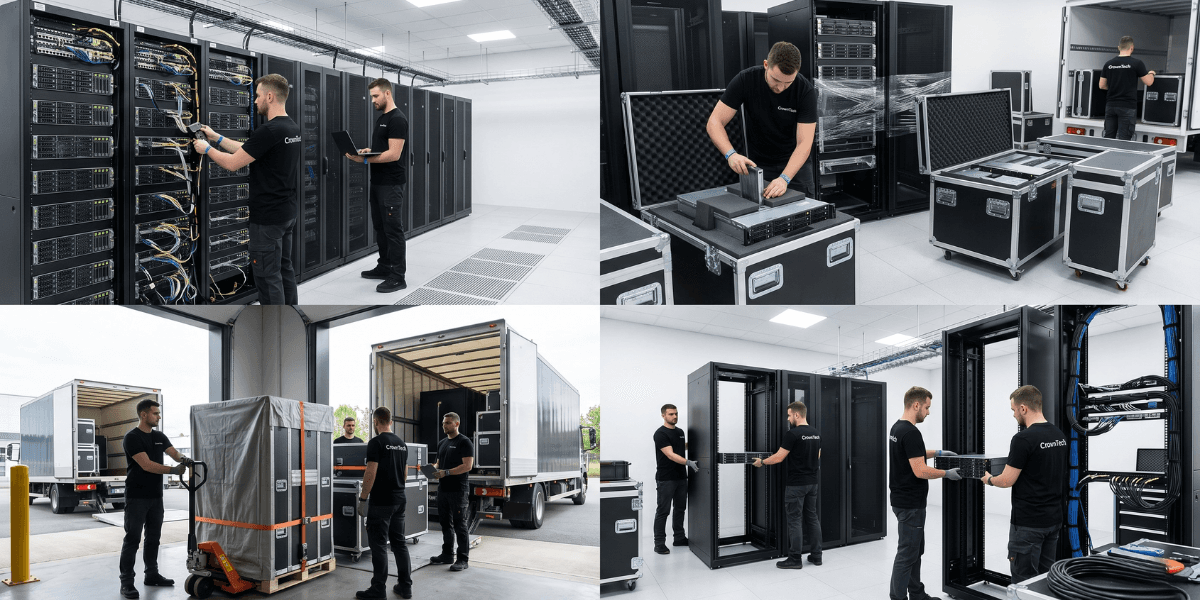
There are six steps to safe server relocation: pre-move documentation and dependency mapping, graceful shutdown in reverse dependency order, anti-vibration transport in purpose-built containers, destination infrastructure pre-validation, startup in documented dependency order, and post-move verification against a pre-move baseline. The "moving" is the least dangerous step, whether you are executing a data centre relocation guide or coordinating a move within your own data centre. Most server relocation projects go awry in the shutdown and startup sequences.
How Servers Are Safely Relocated: The Complete Process
Most people focus on the physical transport when thinking about server relocation safety. That focus is misplaced. A server that is physically unharmed but reconnected out of sequence will do as much harm as dropping a server.
Safe server relocation is a process; it is a sequence of six phases, each having a specific technical requirement. Let's take a look at each of these.
Phase 1: Pre-Move Documentation (2–4 Weeks Before)
Every server needs to be catalogued by role, not just physical location. This documentation is a crucial part of any effective server migration checklist.
- Hostname, OS, primary role, all dependent systems, and all systems that depend on it.
- Front and rear elevation picture of the rack without any cables connected.
- Make sure all cables are marked at each end (patch panel and switch to server).
- All network device configurations are exported and stored in two or more places.
- Dependency tree built → shutdown sequence derived → startup sequence derived.
The startup sequence is everything. Storage before databases. Previously, databases were placed in front of application servers. Authentication is required before anything that needs to authenticate users. The sequence has to be recorded, signed off by the IT lead, and precisely adhered to on execution day.
Phase 2: Destination Pre-Validation (1–2 Weeks Before)
A new server cannot be moved until the new environment is as complete as possible. Every thorough data centre relocation guide will treat this step as non-negotiable:
- Rack positions verified and identified as per the infrastructure inventory.
- Power circuits confirmed correct amperage and correct position.
- Network ports confirmed and patched with VLAN assignments pre-configured.
- Cooling is confirmed operational and adequate for the planned rack density.
- Internet circuit is active, tested, and cloud access verified from the destination.
Phase 3: Graceful Shutdown
Servers must be shut down gracefully, not powered off abruptly. Every service needs time to write pending data to disc and close connections cleanly. Abrupt shutdowns can cause data corruption, particularly on databases and file servers, and are one of the most frequent outcomes of failed server relocations.
Shutdown sequence: application tier first → databases → storage services → authentication services (AD/LDAP last) → network equipment.
Phase 4: Physical Transport
Why Transport Containers Matter - and How to Move a Server Rack Safely
Understanding how to move a server rack starts with knowing that spinning hard disc drives are sensitive to vibration. Moving trucks vibrate. What's needed is a server case designed for the purpose with foam protection for drives that is not a moving blanket or original cardboard package. The container must:
- Support the server's weight without allowing internal movement.
- Provide vibration damping rated for the protection of hard disc drives.
- Allow transport in normal operating orientation (horizontal for rack-mount servers)
One of the best things about outsourcing IT equipment relocation services is that a professional server moving company will employ specialized rack transport containers and temperature-controlled trucks, which cannot be found in the average office or warehouse.
Servers must not be exposed to temperature extremes during transport. Must warm up a cold server in a warm room for 2–4 hours before use to avoid short-circuiting due to condensation on components.
Phase 5: Reconnection at Destination
Reconnection follows the rack elevation documentation from Phase 1 exactly. If you are not sure how to move a server rack and reconnect to the specification, your Phase 1 is your source of authority. Before powering anything on:
- All power connections confirmed secure.
- All network connections match pre-move documentation.
- Cooling confirmed operational.
- No visible damage due to transport.
A skilled server moving company can also help you with the physical racking and structured cabling at the new location to minimize the chance of sequencing errors.
Phase 6: Startup and Verification
The steps of the startup are followed as documented. You need to have a go/no-go gate at each stage of your server migration checklist: You shouldn't allow the next stage to get started until the previous one passes the go check. This process is the discipline that prevents cascade failures.
- Network infrastructure: first verifies routing, internet access, and DNS.
- Authentication (AD/LDAP) verifies that responses are correct.
- Storage: Verify all volumes are mounted and accessible.
- Databases: Verify clean startup and data integrity.
- Application: Servers verify health checks passing.
- Final verification of end-to-end user access and application functionality.
Moving IT is a business continuity issue and not a logistics issue. 20% of safe server relocation is transport; 80% is planning. The companies that have problems Monday morning are the ones that put in the 20% and didn't put in the 80%. It all depends on the dependency map, the destination's pre-configuration, and the startup sequence.
Whether you're doing it yourself or working with a reputable server moving company, following this data centre relocation guide will make sure that nothing is left to chance. Professional IT equipment relocation services handle each step using specialized equipment, trained staff, and processes to ensure a safe and efficient move.
Sources
- Gartner — Average cost of IT downtime: $5,600/minute (2014, widely cited through 2024)
- Ponemon Institute (2016) — Updated downtime cost: ~$9,000/minute average
- ITIC 2024 Hourly Cost of Downtime Survey — 90%+ of enterprises: 1hr downtime costs over $100K.
- Uptime Institute 2022 Outage Analysis — 80% of data centre operators experienced downtime in past 3 years; 60%+ of outages cost over $100K.
- LogicMonitor IT Outage Impact Study — 51% of IT outages are avoidable; companies with frequent outages face 16x higher costs.
- IDC Worldwide Data Protection & DR Survey — Nearly half of data disruptions cause lost productivity; Fortune 1000 downtime up to $1M/hour
- Atlassian — Cost of Downtime — Framework for downtime cost calculation.
- FM Guru / FMSystems — Each employee moved experiences ~4 hours of downtime on average.
- Oxford Economics (2024) — The Hidden Costs of Downtime: The $400B Problem Facing the Global 2000
- BigPanda / EMA Research 2024 — IT Outages: 2024 Costs and Containment — 60% rise in per-minute costs for mid-size orgs vs 2022
Get a Free IT Relocation Risk Audit
Before your next move, let CrownTECH® tell you what could go wrong and what you can do to avoid it. Our proprietary server migration checklist, end-to-end IT equipment relocation services, and certified technicians who know precisely how to move a server rack and every piece of IT infrastructure in it, will give you a free, no-obligation risk assessment for businesses across Canada.
Book Your Free Risk Audit →