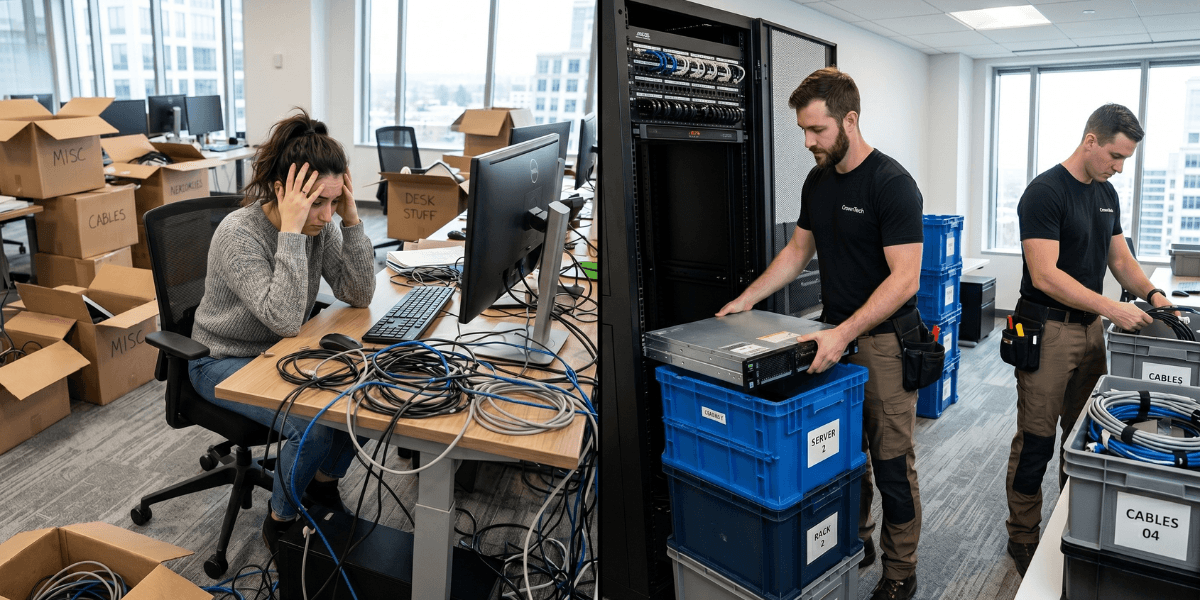
Internal IT teams have the best knowledge of your environment. IT relocation services experts have carried out a dozen or hundreds of relocations. The best outcome is almost always a combination of both options. Your internal team leads planning and verification, while the specialist providing IT relocation services brings methodology, staffing, and equipment. Internal teams generally lack the staffing needed for a complete office IT relocation, know very little about the failure modes of a move, and have little to no experience moving servers. Together, they consistently outperform either one alone.
Internal IT Team vs IT Relocation Experts: What Each Brings
What Your Internal IT Team Does Well
Your internal team has knowledge no external firm can replicate without weeks of immersion:
- They understand what systems are truly critical to the business, not only in theory, but in reality.
- They know the unknown requirements of all the real-world infrastructure.
- They understand the quirks: the server that requires a manual kickstart, the application that has a hardware-tied license.
- They can verify operational status faster than anyone because they know what "working" looks like.
- They have relationships with department heads to get quick answers under pressure.
Where Internal IT Teams Consistently Struggle
Move-Specific Methodology
The strength of your IT team is providing support with your infrastructure. An IT relocation services specialist's expertise is in moving IT. These are distinct sets of skills. The specialist delivers a tried-and-tested methodology, which includes a comprehensive office move IT checklist, pre-move documentation, dependency mapping, physical transport, and startup sequencing. Most internal teams have never had to develop a full IT infrastructure relocation before, which makes this a process that they are generally not expected to develop.
Staffing and Physical Capacity
Typically, a 150-person company will need between 4 and 8 people to work concurrently during an office IT relocation to ensure the teardown, transport, racking, cabling, and verification are completed. Most internal IT teams don't have this number of people, particularly in normal operations and when dealing with the myriad of questions from the rest of the business in the weeks leading up to and including move day.
Specialist Equipment
An anti-vibration server transport container, correct lifting equipment, and the right network testing equipment are commonplace in the kit of the IT relocation services provider. These are not common in corporate IT. Dedicated server migration services fill this void: the difference between good server transport and bad server transport is the difference between a working RAID array and a compromised one. Professional server migration services guarantee that the hardware is delivered securely and is installed and brought up to operating system status.
When you're deeply familiar with an environment, you have blind spots. You don't document certain things because you know them. An external IT infrastructure relocation specialist asks the "obvious" questions, such as "Why is this server connected this way?" What happens if this dependency fails first? Those are the internal teams that sometimes avoid because the answer is obvious. Questions arise on the surface that the familiarity of the questions hides. An experienced office move IT checklist will pick up 3–5 dependencies that internal teams had never identified as a risk.
Relocating IT infrastructure is a business continuity issue, not a logistics issue. The best of the two worlds is for internal IT to take charge of scoping and verification, while a specialist takes care of execution. The specialist brings methodology for the move, staffing, and equipment. Your team comes with an understanding of the environment and sign-off power. Neither is redundant. Both are necessary.
The Scenarios Where Internal IT Can Lead
- Less than 30 workstations and no complex server infrastructure.
- In an entirely cloud-based environment.
- The IT team has personally executed multiple similar moves before.
- A generous time frame, several weeks and not just one weekend.
- No regulatory requirements for data handling during the move.
Even in simpler scenarios, engaging dedicated server migration services for any on-premise hardware is strongly recommended; the risk to physical equipment rarely justifies a fully internal approach.
The Right Question to Ask Your IT Director
Avoid asking, "Can you handle this?" This question will almost always be answered with a "yes." Questions to ask include "Have you done this before?” "Do you have the staffing to do a full night office IT relocation without disrupting the rest of your business?" and "Is it the best use of your bandwidth during one of the most complex weeks in your company's year?"
Before your move, go through a comprehensive office move IT checklist, including asset tagging, dependency mapping, cutover timing, and rollback. Most internal teams are too short on the list of what goes on the list. The success of IT relocation services execution depends on the partner you choose.
CrownTECH® provides professional IT relocation services alongside internal IT teams on every engagement. We don't replace them. We provide them with the skills and expertise required to engage in the move and allow them to concentrate on what they are good at and what they want to achieve: knowledge of and verification of the environment.
Sources
- Gartner — Average cost of IT downtime: $5,600/minute (2014, widely cited through 2024)
- Ponemon Institute (2016) — Updated downtime cost: ~$9,000/minute average
- ITIC 2024 Hourly Cost of Downtime Survey — 90%+ of enterprises: 1hr downtime costs over $100K.
- Uptime Institute 2022 Outage Analysis — 80% of data centre operators experienced downtime in past 3 years; 60%+ of outages cost over $100K.
- LogicMonitor IT Outage Impact Study — 51% of IT outages are avoidable; companies with frequent outages face 16x higher costs.
- IDC Worldwide Data Protection & DR Survey — Nearly half of data disruptions cause lost productivity; Fortune 1000 downtime up to $1M/hour
- Atlassian — Cost of Downtime — Framework for downtime cost calculation.
- FM Guru / FMSystems — Each employee moved experiences ~4 hours of downtime on average.
- Oxford Economics (2024) — The Hidden Costs of Downtime: The $400B Problem Facing the Global 2000
- BigPanda / EMA Research 2024 — IT Outages: 2024 Costs and Containment — 60% rise in per-minute costs for mid-size orgs vs 2022
Get a Free IT Relocation Risk Audit
Before you take your next step, CrownTECH® has the answers to what might go wrong and how to avoid it. Our IT relocation services include a free, no-obligation risk assessment for businesses across Canada.
Book Your Free Risk Audit →